
Google Business Profile calls usually stall for one reason: the profile, not the ranking. If yours shows up but the phone doesn’t ring, look at the wrong categories, a thin services list, old photos, too few recent reviews, or a number that’s hard to tap. Start with the Performance tab to see whether you have a visibility problem or a conversion problem, then work through the fixes below in order.
Plenty of Houston owners tell us some version of the same thing: the profile appears when they search their own name, people are viewing it, and yet Google Business Profile calls stay flat. That’s frustrating, because it feels like you’ve done the hard part. You haven’t been ignored. You’ve been looked at and passed over. The good news is that this is usually fixable, and most of the fixes cost nothing but a few focused hours. Here’s how to work through it.
Visibility Problem or Conversion Problem? How to Tell From the Performance Tab
Before you change anything, find out what is actually broken. Sign in to the Google account that manages your profile, then open the Performance tab. You’ll see how many people viewed your profile on Search and Maps, plus the number of calls, website clicks, and direction requests.
Look at the last three to six months, not just last week.
- If views are low, you have a visibility problem. Too few people are finding you, which usually points to your categories, your service area, or how you rank for the searches that matter.
- If views are healthy but calls are low, you have a conversion problem. People see your listing and decide not to contact you. This is the more common situation for owners whose Google Business Profile is not getting calls, and it’s the focus of everything below.
Also open the search terms report in the same tab. If the searches bringing people to you don’t match the work you want, relevance is part of the problem, and the categories and services section will help. If you want an outside read on the whole picture, a local SEO audit will show the same gaps from the searcher’s side.
Make Calling Easy: Phone Number, Hours, Holiday Hours, and Call Tracking
Think of a homeowner standing in a flooded garage with one hand on a phone. They won’t dig around for your number. Take away every obstacle.
Check Your Phone Number
Your real business number should be a local Houston-area number, ideally with a 713, 281, 832, or 346 area code, that goes to a person or a voicemail you actually check. It should match your website and other online listings exactly. If your website lists [phone], your other listings should list [phone] in the same format. Mismatches confuse customers and search engines alike. If you use call tracking, the one place your real number won’t be the primary is your profile, which is covered below.
Keep Hours and Holiday Hours Accurate
A profile that says you’re closed when you’re open costs you calls. One that says you’re open when nobody answers costs you reviews. Update your regular hours, then use the special hours feature for Thanksgiving, Christmas, the Fourth of July, and any day you close for a storm. Houston weather can shut a business down fast, so check your hours before hurricane season and after any major event. If you offer after-hours or emergency service, say so.
Set Up Call Tracking Without Breaking Your Listing
Call tracking tells you which calls come from your profile, but the setup has to follow how Google works. Google displays only the primary phone number on Search and Maps; additional numbers stay hidden from searchers. That means the tracking number goes in the primary slot, and your real business number goes in as an additional number.
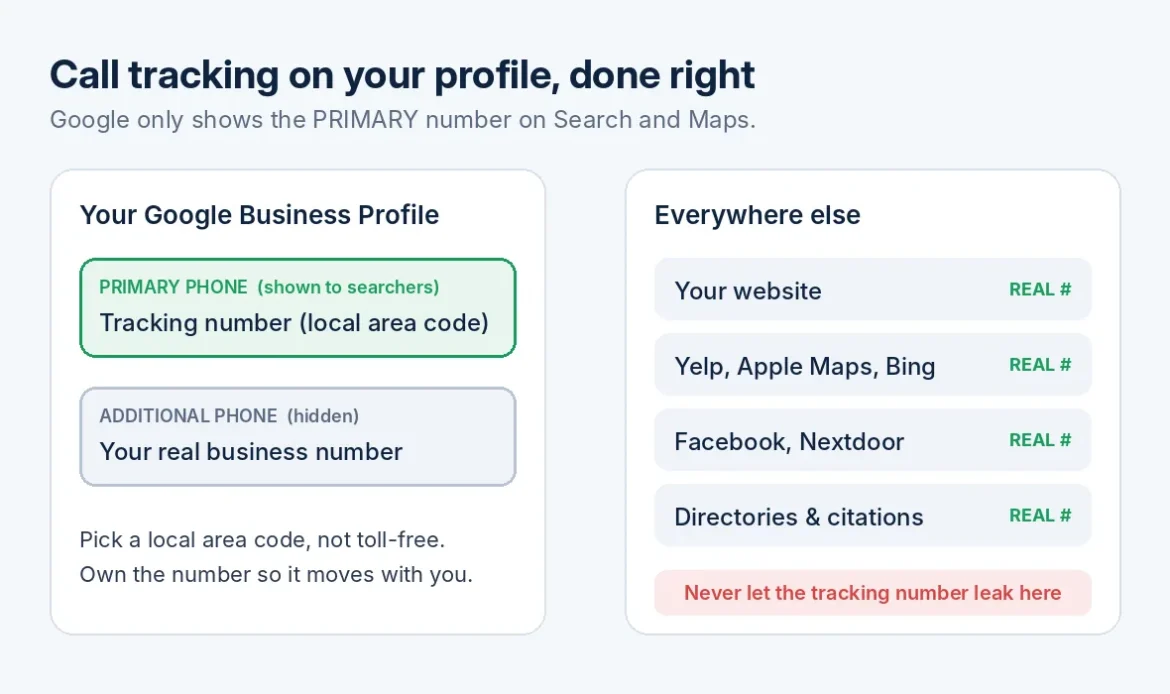
To do this without breaking your listing, pick a tracking number with a local Houston area code instead of a toll-free one, so it still looks like a neighborhood business. Keep your real number on your website and in every other directory, and never let the tracking number leak into those other listings, because mismatched numbers across the web confuse both customers and search engines. Choose a provider that records and reports calls, and make sure you own the number so you can keep it if you switch vendors. Check your profile a few days later to make sure nothing changed unexpectedly.
Categories and Services That Match What People Search
Your primary category is one of the strongest signals Google uses to decide what you do. Choose the one that fits your main source of income, and be specific. “Roofing contractor” beats “Contractor.” Then add secondary categories for services you really offer. Don’t add categories for work you don’t do, since that attracts the wrong calls.
Next, build out your services list. Many profiles list three or four vague items and stop. Add every service you perform, using the words customers use. “Slab leak repair” and “tankless water heater installation” tell a searcher you handle their exact problem. Add a short description to each, and a price or price range if you’re comfortable sharing one.
Finally, review your service area. List the neighborhoods and cities you truly serve, such as The Heights, Katy, Sugar Land, Pearland, and The Woodlands. A clear service area keeps you in front of people you can actually help, and it’s one of the first things we check in our local SEO work. Then check your business description. Say plainly what you do, who you do it for, and how long you’ve been doing it.
Reviews That Make People Call
Most people read reviews before they pick up the phone. A steady flow of recent, specific reviews often matters more than a perfect star rating.
Here’s what works:
- Ask every happy customer right after the job, while the work is fresh. Text them your direct review link so it takes one tap.
- Reply to every review, good or bad, in a calm and professional voice. Thank people by name and mention the work you did.
- For a negative review, acknowledge the problem, apologize if it’s warranted, and offer to resolve it offline. Future customers are reading your reply, too.
Don’t offer discounts or gifts in exchange for reviews, and don’t only ask customers you expect to be happy. Google’s policies prohibit both.
Aim for a steady trickle instead of twenty reviews in one week followed by silence. A profile whose newest review is two years old can look like a business that has closed.
Photos and Posts: Proof You’re Real and Active
Photos answer a question people won’t ask out loud: is this a real business? Upload your logo and a clear cover photo first. Then add pictures of your storefront, your branded trucks, your team, and finished jobs. Before-and-after shots work well for contractors, salons, and auto shops. Skip stock photos, and add a few new ones each month.
Posts are a simple way to show activity. Share a seasonal reminder, such as an AC tune-up before the summer heat, a current offer, or a recent project. Add a button with a clear action like Call now. Posting every week or two is plenty. Don’t expect posts alone to change your ranking; their job is to give a visitor a reason to trust you and act.
What Your Website Has to Do Once They Click
Some people tap your website link instead of calling, so what they land on matters. Point the link to your most relevant page, which isn’t always the homepage. A plumbing company might link to its main plumbing page rather than a general welcome page.
Put your phone number at the top, with a tap-to-call button on mobile. Make sure the page loads quickly on a phone, lists the services and neighborhoods you cover, and shows your hours and a few real reviews. Skip long forms that stand between a visitor and a conversation.
Finally, add UTM tracking to the website link on your profile. That lets your analytics show how many visitors came from Google Business Profile and what they did next.
Showing Up in AI Answers
More people now ask Google’s AI Overviews, ChatGPT, and similar tools questions like “Who’s the best AC repair company in Houston?” No one controls those answers, and anyone promising a guaranteed spot is guessing. But the same basics that help your profile also help here.
Keep your name, address, and phone number consistent everywhere. Build service pages that say exactly what you do and where. Earn real reviews that mention specific services. Answer common customer questions on your website in plain language. These tools lean on information they can verify across sources, so a clear, consistent presence gives them something to work with. We go deeper on this in our AI SEO service.
Track Google Business Profile Calls Month to Month
Getting more Google Business Profile calls is a steady process, and you can’t improve what you don’t measure. On the first of each month, record your profile views, calls, website clicks, and direction requests in a simple spreadsheet. Add the number of new reviews and a note about anything you changed.
Include calls from your tracking number, and ask new customers, “How did you hear about us?” Their answers often reveal calls your reports miss.
Change one or two things at a time and give each change four to six weeks before judging it. In Houston, demand shifts with the seasons, so compare each month to the same month last year when you can.
FAQ
How long does it take to see more Google Business Profile calls?
Small fixes like correcting your phone number, hours, and photos can show up within a few weeks. Reviews, categories, and services usually take longer, so give steady work two to three months before judging the results. Seasonal swings are normal, so don’t panic over a slow month. We cover the timeline in more detail in how long SEO takes in Houston.
Should I use a call tracking number on my profile?
Yes, if you set it up correctly. Google shows only the primary phone number on Search and Maps, so the tracking number goes in the primary slot and your real business number goes in as an additional number. Use a local Houston area code for the tracking number, keep your real number on your website and every other directory, and never let the tracking number leak into other listings. That way you see which calls come from your profile without creating mismatches elsewhere on the web.
Should I turn on messaging?
Google retired the chat feature on business profiles in 2024, so there’s likely no messaging switch to turn on. Check your dashboard to see what’s currently offered. In the meantime, focus on making your phone easy to reach and, if you take texts, list that number clearly on your website.
If you’d rather have someone work through your profile with you, SEO Impact Pros handles Google Business Profile optimization for Houston businesses. Get in touch and we’ll start with your Performance tab.