
Photos are the most viewed part of your Google Business Profile and usually the most neglected. Most Houston business owners set up the profile, upload a logo and maybe a shot of the front door, then never open the photo section again. Meanwhile, those photos are what people study before deciding whether to call you.
Here’s what photos genuinely influence, what Google requires, which shots are worth taking, and a routine that keeps the gallery current without turning into a part-time job.
Photos influence decisions more than rankings
There’s a lot of exaggeration on this topic, so let’s start with what photos actually do.
Photos are primarily a conversion factor. When someone finds you in the map pack, your photos are what convince them you’re a real, active, professional business. A profile with recent shots of actual work gets more calls than a profile showing a logo and two blurry pictures from 2019. That’s the main effect, and it’s the one worth your time.
There’s a secondary effect worth knowing about. Google runs image recognition on everything you upload. It can tell what’s in a photo, and pictures of specific services or products help Google connect your profile to relevant searches. Think of it as supporting evidence rather than a ranking lever. If your profile isn’t showing up in the map pack at all, photos are almost never the reason. The culprit is usually categories, reviews, or proximity, which we break down in our article on why your business isn’t showing up in Houston’s map pack.
Photos won’t get you ranked. They decide what happens after you rank.
If you’d rather have someone run the profile for you, our Google Business Profile management service does all of this monthly.
Google’s actual photo requirements
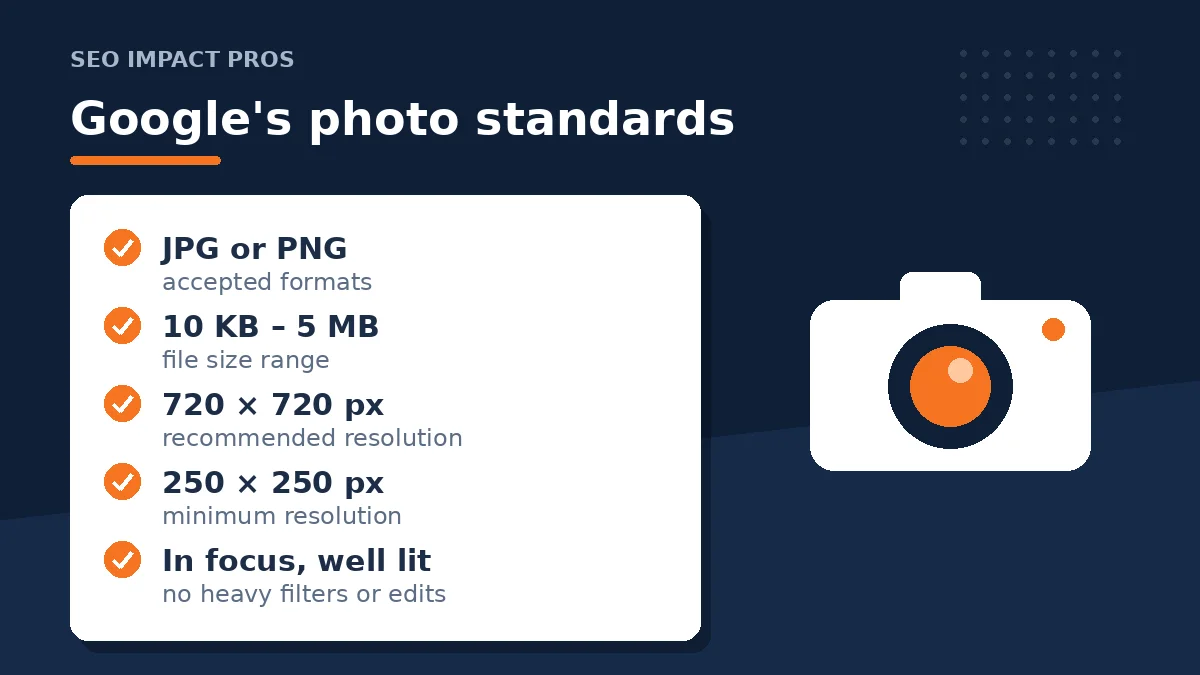
Google’s official photo standards are simpler than most guides make them sound:
- Format: JPG or PNG
- File size: between 10 KB and 5 MB
- Recommended resolution: 720 x 720 pixels
- Minimum resolution: 250 x 250 pixels
- Quality: in focus, well lit, no heavy filters or significant alterations
The quality line matters more than the pixel counts. Google wants the image to represent reality. Over-edited photos, AI-generated storefronts, and images plastered with promotional text can get removed. Keep your photos honest and you’ll never have a problem here.
A few type-specific sizes worth knowing:
- Logo: square, 720 x 720 pixels
- Cover photo: 16:9 aspect ratio, ideally 1024 x 576 pixels
- General business photos: square at 720 x 720, or larger like 1200 x 900
One caveat about the cover photo. Setting it tells Google your preference, but Google reserves the right to display a different image, including customer uploads, if it thinks another photo represents the business better. A strong cover photo improves your odds. It doesn’t lock anything in.
The photos worth taking
You don’t need dozens. You need the right ten to fifteen, refreshed over time. Roughly in order of importance for most local businesses:
Exterior shots. Two or three from different angles, including one from the street the way a customer would approach. In a metro as spread out as Houston, people genuinely use these to confirm they’re pulling into the right parking lot. If you’re open evenings, shoot one at dusk too.
Interior shots. Lobby, waiting area, workspace, whatever a first-time customer sees when they walk in. These answer the unspoken “what am I walking into?”
Team photos. Real staff, not stock models. A photo of the actual person who answers the phone or shows up at the door builds more trust than anything else you can upload. Home service businesses especially, since a stranger is coming to someone’s house.
Work in progress and completed work. For service businesses this is the highest-value category. Before-and-afters, equipment in use, finished jobs. Proof of competence beats any description you could write.
Products or service-specific shots. If people search for a specific thing you offer, photos of that thing help Google make the connection and help the customer make the decision. Google even publishes category-specific photo suggestions for restaurants, hotels, and service businesses.
Skip the inspirational quotes, flyers, website screenshots, and anything with heavy text overlay. That material belongs in Google posts, if anywhere. Not the photo gallery.
Common mistakes we see on Houston profiles
Stock photos. Customers can tell. Google’s guidelines also lean against imagery that doesn’t show your actual business. A slightly imperfect real photo beats a polished stock image every time.
Uploading once and stopping. A gallery where the newest photo is three years old reads like a business that might not still be operating. Recency matters to the humans scrolling your profile.
The logo-only gallery. We’ve audited profiles with five copies of the logo at different sizes and nothing else. That tells customers nothing and wastes the most visible real estate on the profile.
Obsessing over geotagging. There’s a persistent belief that embedding GPS coordinates in image files boosts local rankings. We’ve never seen convincing evidence for it, and Google processes uploads in ways that make embedded metadata unreliable at best. Spend that time taking better photos.
Ignoring customer uploads. Anyone can add photos to your profile, and Google may feature them prominently. You can’t delete customer photos yourself, but you can flag ones that violate Google’s content policy, like photos of the wrong business or misleading images. Check the “by customers” tab now and then so you’re not surprised by what’s representing you.
A photo routine that takes 15 minutes a month
What we recommend to clients, and it’s deliberately boring:
- Once a month, take three to five new photos on your phone. A recent job, a team member, something new in the shop. Normal phone camera, good light, no filter.
- Upload them through the profile manager: search your business name on Google while signed into the owner account, choose Edit profile, then Photos, and add them under the right category.
- Once a quarter, scan the full gallery. Remove anything outdated you uploaded yourself and flag any customer photo that breaks policy.
That’s the whole system. A profile gaining a few real photos every month looks alive, and that steady drip is worth more than a one-time dump of forty images.
Our take
We’d rather see a Houston business with twelve honest phone photos than a professional shoot from four years ago and nothing since. Professional photography is great if you can get it. The businesses that win the photo game, though, treat it as an ongoing habit instead of a launch task. Photos convert the attention your fundamentals earn, so make sure your review flow is working alongside them.
Frequently asked questions
Do photos directly improve my Google ranking?
Not in any meaningful way. Their job is converting people who already found you into callers and visitors. Google’s image analysis adds minor relevance context at most. Categories, reviews, and proximity drive map pack rankings.
How many photos should I have on my profile?
Enough to cover the basics: exterior, interior, team, and examples of your work. For most businesses that’s ten to fifteen good photos to start, with a few added each month.
Should I geotag my photos before uploading?
We don’t bother, and we don’t recommend you do either. There’s no reliable evidence it affects rankings, and the time is better spent on photo quality and consistency.
Can I remove bad photos customers uploaded?
Not directly. You can flag photos that violate Google’s content policy from the photo viewer and Google will review the report. Photos that are merely unflattering but accurate usually stay.
Prefer getting straight answers like this?
Add SEO Impact Pros as a preferred source on Google and our guides will show up more often when you search for local SEO topics.