
If your business isn’t showing up on Google Maps in Houston, it’s usually one of three things: the searcher is too far from you, your primary category doesn’t match what they typed, or competitors have more recent reviews and stronger local signals. You can’t change distance, but you can fix categories, reviews, listing consistency and your website. Here are the seven causes we find most often in Houston audits, in the order we check them.
Most of them surface the moment an owner asks us, “Why is my business not showing up on Google Maps?” and we open the profile.
Why Is My Business Not Showing Up on Google Maps? How Google Decides
Google determines local rankings using three primary factors: relevance, distance, and prominence. Google documents all three, and together they decide which businesses a searcher sees first.
Relevance measures how closely your business matches what someone searches for. A homeowner looking for a roofing contractor should see businesses that actually provide roofing, not companies with unrelated primary categories.
Distance measures how far each matching business is from the searcher. That’s why the same search produces noticeably different results in different parts of Houston.
Prominence reflects how established and well-known your business appears. Google may consider reviews, links, and references to your business across the web.
These three factors work together rather than acting as independent ranking switches. A business with an excellent website can still struggle to appear for a search made far outside its practical service area. For Houston businesses, understanding this balance is the foundation of learning how to rank higher on Google Maps. We go deeper on each factor in our guide to Google’s local ranking factors.
Map Pack vs. Google Maps vs. Local Organic Results
The Google Map Pack is the group of local business listings, usually three, that appears within Google Search alongside a map. Google Maps is Google’s dedicated mapping platform, where customers compare locations, read reviews, and request directions. Local organic results are the traditional website listings, influenced by standard SEO factors.
Your company may appear in one without the others, so improving website rankings alone doesn’t guarantee better Maps visibility. Your local SEO strategy has to support both your website and your Google Business Profile. We’ve written separately about what keeps Houston businesses out of the Map Pack.
1. Your Business Is Too Far From the Searcher
Distance is one of the most overlooked reasons a business ends up not showing up on Google Maps. Houston covers an enormous metropolitan area, and a person searching for an emergency plumber in Katy will see a very different set of results than someone searching Downtown. Your profile may be well optimized, and your reviews may be excellent, yet your listing can still fail to appear for searches outside its geographic reach. That isn’t necessarily an SEO problem. Google may simply consider another business more geographically relevant to that particular search.
How to fix it: Begin by identifying the neighborhoods where your customers actually search for your services, such as The Heights, Sugar Land, Pearland, Katy, Cypress, or Spring. Then create genuinely useful, location-specific content that explains which areas you serve. If you operate a service-area business, configure accurate service areas in your Google Business Profile. Adding more locations doesn’t guarantee rankings there, so never list areas you don’t truly serve. Our guide to how local SEO works for Houston businesses covers service-area setup in more detail.
2. Your Primary Business Category Is Incorrect
Your primary category tells Google what your company actually does. A Houston roofing contractor listed under a broad construction category will have a weaker relevance match than a competitor correctly categorized as a roofing contractor. The same problem affects law firms, dental practices, HVAC companies, and many other industries.
How to fix it: Open your Google Business Profile and review your primary category. Compare it with the services you actually provide and with the categories used by successful competitors. Choose the most accurate option available rather than the one that merely looks popular. You may also add secondary categories to describe additional services, but keep them closely related to your business. Unrelated categories won’t help you appear for more searches, and they can blur your relevance. If you’re unsure, we’ve written a full guide on choosing the right primary category.
3. Your Name, Address, and Phone Number Are Inconsistent
Google needs accurate information to recognize your business across the internet. Problems begin when your Google Business Profile lists one phone number, your website shows another, and an old directory still displays a previous address. These inconsistencies also confuse customers, who may call a disconnected number or arrive at the wrong location. Your business name, address, and phone number, commonly called NAP information, should match everywhere.
How to fix it: Conduct a basic citation audit across your website, Google Business Profile, Yelp, Bing Places, Apple Business Connect, Facebook, the Better Business Bureau, and relevant industry directories. Correct every outdated address, phone number, suite number, and business name you find. Always use your legitimate business name. Never add extra keywords to it, and never invent location variations to target additional Houston neighborhoods; both violate Google’s guidelines for representing your business. A citation check is one of the first steps in our local SEO audit.
4. Your Google Reviews Have Gone Quiet
Customer reviews shape how potential customers judge your business, and they contribute to the prominence signals Google considers. A company with a strong review history but no recent feedback can look inactive beside a competitor that earns genuine reviews consistently. Quantity, quality, and recency all deserve attention. However, reviews should grow from a real customer experience strategy, not from an attempt to manipulate rankings.
How to fix it: Create a simple process for requesting feedback after you complete a project or service. Send customers a direct Google review link, make the process convenient, and allow them to share honest opinions. Respond to every review professionally, thanking happy customers and addressing complaints with clear, helpful answers. Never purchase reviews, reward positive ratings, or ask customers to include specific keywords. These practices can violate Google’s policies and damage customer trust. We’ve shared a complete playbook for getting more Google reviews without begging or buying them.
5. Your Website Is Too Thin to Support Local SEO
Your Google Business Profile isn’t the only source Google uses to understand your company. Your website adds context about your services, expertise, location, and identity. Consider a Houston HVAC company with a single homepage and one short paragraph about heating and cooling. A competitor with dedicated pages for air conditioning repair, furnace installation, emergency service, and service coverage gives customers and Google far more useful information.
How to fix it: Build dedicated service pages that describe each offering, the problems customers face, and the solutions you provide. Mention Houston and the communities you genuinely serve naturally, without repeating location keywords needlessly. Also review your page titles, meta descriptions, mobile usability, loading speed, internal links, contact details, LocalBusiness structured data, and overall content quality. Above all, make certain everything matches your Google Business Profile.
6. Your Google Business Profile Is Incomplete
An incomplete profile leaves important questions unanswered. Customers want to know your hours, your services, how to reach you, and whether you serve their area. Google also uses profile details to match your business with relevant searches. Missing services, outdated hours, a thin description, or an incorrect category all weaken the quality of your listing.
How to fix it: Review every section of your profile and complete whatever applies, including your description, categories, hours, special hours, services, phone number, website link, address or service areas, and relevant attributes. Add recent, authentic photographs of your team, premises, finished projects, or products; we explain what photos actually do for your profile in a separate article. Then update the profile promptly whenever your details change.
7. Your Listing Is a Duplicate or Has Been Suspended
Sometimes the problem is more serious. Duplicate listings appear when a company moves, changes its name, or has several employees create profiles without checking for an existing one. Suspensions occur when a profile violates Google’s guidelines, for example through misleading information, an ineligible address, or a keyword-stuffed business name.
How to fix it: Search for your business name and address on Google Maps and look for multiple listings. If you find duplicates, follow Google’s official process for resolving them, and don’t create new listings to replace one that has disappeared. If your profile is suspended, sign in to your Business Profile account, review the notifications, and correct the violation before you request reinstatement. Submit supporting evidence through Google’s appeal process. Resolving the underlying issue works far better than making changes without understanding why the listing vanished.
How to Check Where Your Business Really Ranks on Google Maps
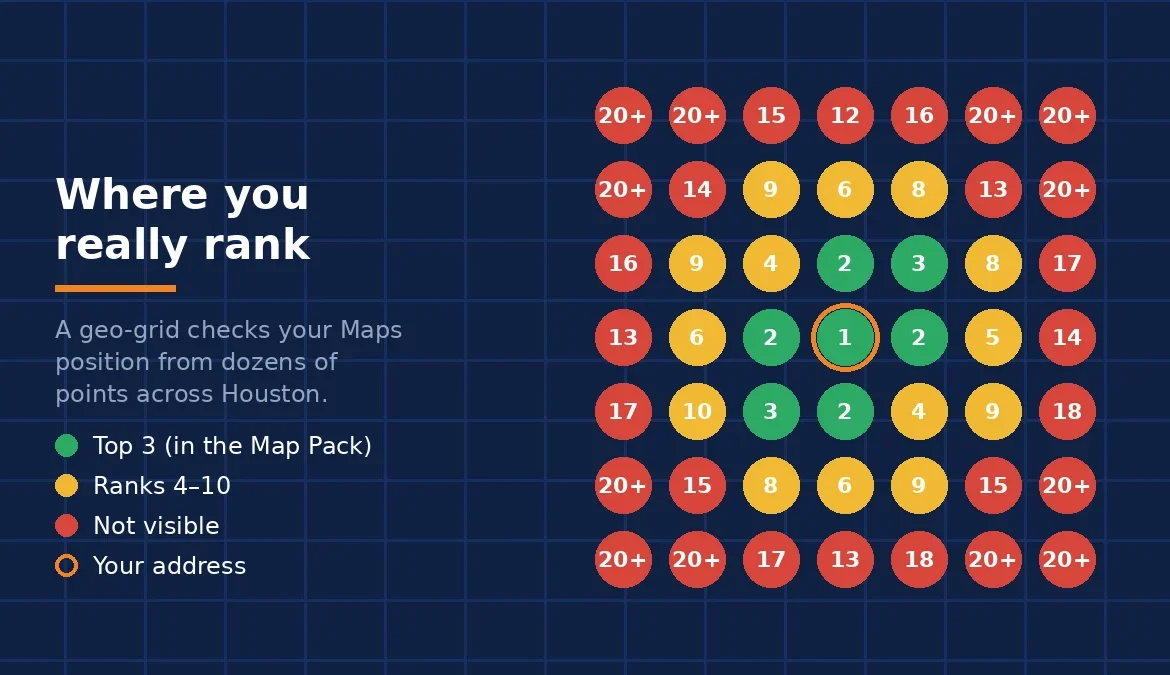
Searching for your own business from your office or home isn’t a reliable way to measure visibility. Google considers the searcher’s location, so you may rank near the top where you sit and far lower for a customer across town. Even incognito mode doesn’t remove that geographic influence.
A far better approach is a geo-grid rank tracker. It checks your visibility from multiple points across your service area, so instead of a single ranking for the entire city, you get a location-based view of where your listing performs well and where visibility drops. A Houston business may dominate around its own address yet barely appear in neighboring communities. That tells you exactly where to focus; our earlier article on tracking local visibility walks through reading a grid report.
Also review your Google Business Profile performance data. Calls, website clicks, direction requests, and search visibility matter more than rankings alone, because attracting relevant customers is the real objective.
Frequently Asked Questions
How long does it take to show up in the Google Map Pack after fixing these issues?
There’s no guaranteed timeline. Straightforward corrections, such as updating business information or selecting an accurate category, can take effect relatively quickly.
Improvements involving reviews, website relevance, and prominence usually require sustained effort over a longer period. Fixing one issue doesn’t guarantee an immediate ranking jump, because Google weighs several factors together.
Can my business rank on Google Maps all over Houston?
A business can appear in searches across many Houston neighborhoods, but consistent citywide visibility is never guaranteed. Proximity plays a major role, and competitors closer to a given searcher may receive priority. Focus on the areas you genuinely serve, build relevant local content, and measure your visibility from different locations instead of expecting one ranking to represent the entire city.
Does my website affect my Google Maps ranking?
Yes. Your website supports your local presence through service information, location details, and consistent business data. However, website optimization alone doesn’t guarantee Google Maps rankings, because your Business Profile, proximity, prominence, and relevance also influence local results.
Make Your Houston Business Easier to Find
When your business isn’t showing up on Google Maps, the first step is to identify the actual cause. Start with the fundamentals: confirm your primary category, correct inconsistent business information, and strengthen your website and Business Profile. Then monitor your visibility across the Houston neighborhoods you genuinely serve.